



CRM in software refers to customer relationship management systems that help businesses organise customer information, track sales conversations and manage relationships in one place. CRM software can improve how your team handles enquiries and follows up with customers, but not every business needs it. The right choice depends on your customer volume, processes and growth plans.
Key takeaways
CRM software brings customer records, sales activities and communication histories into a central system.
CRM software helps teams manage customer relationships but does not automatically generate sales or replace good customer service.
A business may not need dedicated CRM software if its customer records and follow up processes are already manageable.
What is CRM in software?
CRM in software means using a digital system to manage information and interactions involving your customers and potential customers. CRM stands for Customer Relationship Management, a business approach focused on building, maintaining and improving customer relationships.
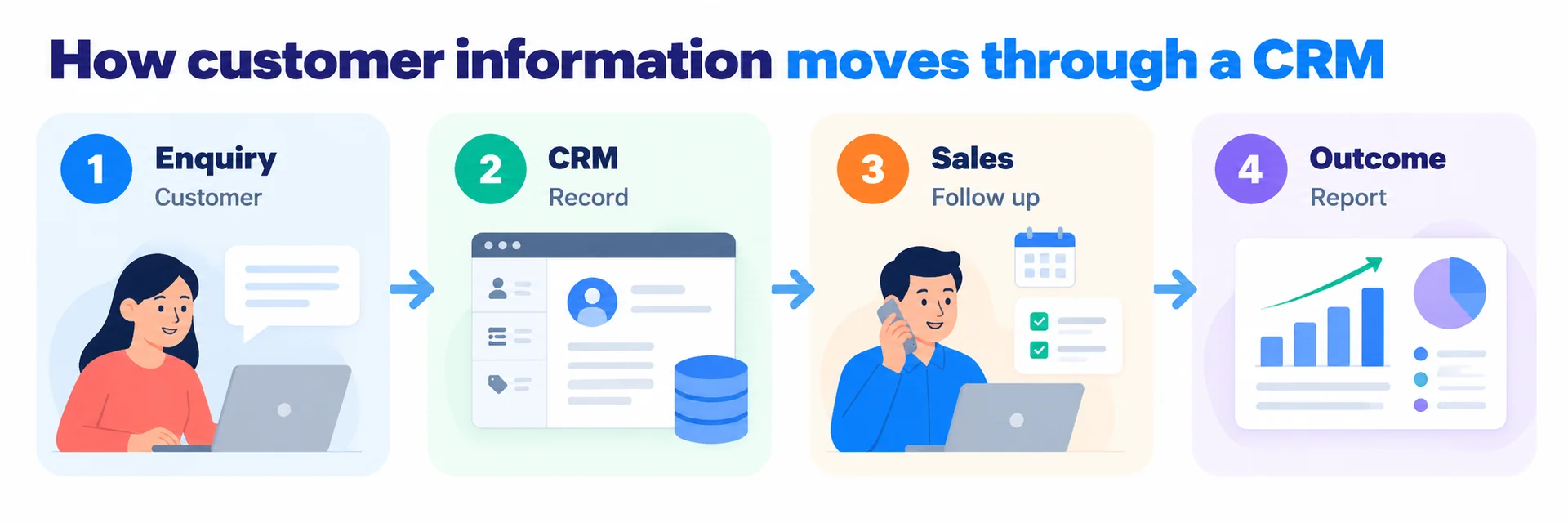
Think about how your business handles a new enquiry.
Someone contacts your company through a website form. Your sales team responds by email, discusses requirements over WhatsApp and arranges a meeting. A quotation follows, and someone needs to remember when to check back.
Without a central system, information may end up scattered across inboxes, spreadsheets and individual employees' phones.
CRM software brings those records together so your team can see what has happened, who is responsible and what needs attention next.
What information does CRM software store?
A typical CRM system can manage several types of information.
CRM feature | What it does | Business example |
|---|---|---|
Contact management | Stores customer and company details | Keeping contact information for prospective clients |
Lead management | Tracks potential customers | Recording enquiries from your website |
Sales pipeline | Shows the progress of sales opportunities | Tracking quotations awaiting approval |
Activity tracking | Records calls, meetings and follow ups | Seeing when a salesperson last contacted a client |
Task management | Assigns work and reminders | Scheduling a follow up after a product demonstration |
Reporting | Shows sales activity and performance | Reviewing the number of enquiries converted into customers |
Not every CRM platform includes every feature. Some focus on sales, while others also support marketing and customer service.
The main purpose remains the same: helping your team manage customer relationships with better information and clearer processes.
Why does CRM software matter for businesses today?
CRM software matters because customer conversations increasingly happen across different channels, while businesses still need one reliable record of each relationship.
A potential customer might discover your company through Google, send a website enquiry, continue the discussion over WhatsApp and eventually make a purchase after several conversations.
If those interactions are recorded separately, your team may struggle to understand the full customer history.
The challenge becomes greater when multiple employees handle the same account.
Customer information should not depend on one employee
Imagine a salesperson taking annual leave while an important client is waiting for a quotation.
If the salesperson keeps all relevant details in a personal inbox, another employee may have difficulty continuing the conversation.
A CRM gives authorised colleagues access to recorded customer information, helping them understand previous discussions and outstanding tasks.
The benefit is continuity. Customers should not need to explain the same requirements every time they speak to someone new.
CRM helps businesses make better use of existing enquiries
Many businesses focus on attracting new customers but pay less attention to what happens after someone makes contact.
An enquiry may receive an initial response, followed by a quotation that nobody follows up.
CRM software makes these unfinished conversations easier to identify.
Managers can review open opportunities, assign responsibilities and see which enquiries need attention.
However, CRM cannot guarantee that a prospect will buy. Pricing, product suitability, service quality and the salesperson's judgement still influence the outcome.
Customer data protection matters in Malaysia
Malaysian businesses must also consider how they collect, store and use customer information.
Malaysia's Personal Data Protection Act 2010 regulates the processing of personal data in commercial transactions, subject to its scope and exemptions. The Personal Data Protection (Amendment) Act 2024 introduced further changes to the legal framework.
A CRM implementation should therefore consider:
Who can access personal information
Whether the business has an appropriate basis for collecting and using customer data
How customer records are protected
How long personal information should be retained
How the business handles relevant data protection rights and obligations
CRM software does not automatically make a business compliant with Malaysian privacy requirements. Your organisation remains responsible for implementing appropriate policies, safeguards and procedures.
How does CRM software work step by step?
CRM software works by recording customer information and organising the activities that follow each interaction. Its value becomes easier to understand when you follow a customer from the first enquiry through to a completed sale.
Consider a Malaysian company that supplies office furniture to other businesses.
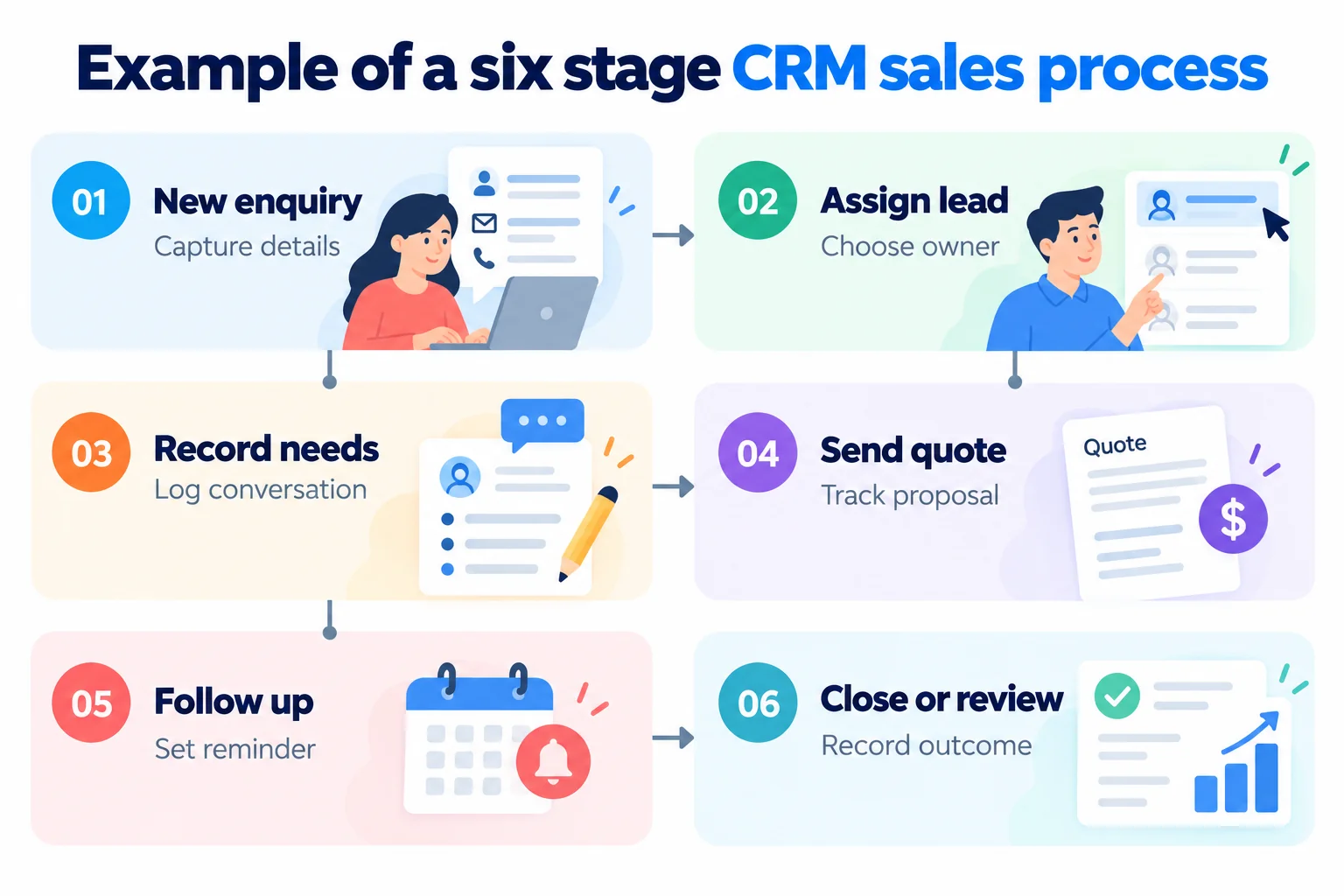
Step 1: A customer submits an enquiry
A purchasing manager completes a form on the supplier's website, requesting prices for 30 office chairs.
The CRM creates a new lead record if the website and CRM are integrated.
The record may include the customer's name, company, contact details, product requirements and enquiry source.
Step 2: The enquiry is assigned to a salesperson
The CRM assigns the lead to an employee based on configured rules or a manager's decision.
The salesperson can review the enquiry and contact the customer.
A shared record helps prevent two employees from unknowingly responding to the same request.
Step 3: The salesperson records the discussion
During the conversation, the customer explains that delivery is required within three weeks.
The salesperson adds the requirement to the CRM, along with the agreed next action.
Other authorised team members can review the information when needed.
Step 4: The opportunity moves through the sales pipeline
After preparing a quotation, the salesperson changes the opportunity status to indicate that a proposal has been sent.
The sales pipeline shows which opportunities are new, being discussed, awaiting decisions or completed.
Managers can use this information to understand the progress of potential sales.
Step 5: The CRM reminds the salesperson to follow up
The salesperson schedules a reminder for three working days after sending the quotation.
Depending on the platform and configuration, the CRM may also support automated follow up messages.
Automation should support meaningful communication rather than produce repeated messages that frustrate customers.
Step 6: The outcome is recorded
If the customer accepts the quotation, the salesperson marks the opportunity as won.
If the customer declines, the salesperson can record the reason.
Over time, these records help the business identify common objections, understand sales activity and review its customer acquisition process.
The CRM may also exchange information with accounting, inventory or order management software where suitable integrations exist.
What is CRM really meant to solve?
CRM is meant to solve problems with customer information, communication and accountability. The software is useful, but the bigger issue is often how a business manages relationships before installing it.
People searching for what is CRM usually encounter explanations about databases, sales pipelines and automation.
Those features matter, but they do not explain why some CRM projects disappoint.
CRM is a business practice before it is software
The CRM meaning business owners should understand is straightforward: customer relationship management is the organised practice of maintaining relationships with existing and potential customers.
Software supports that practice.
If your employees rarely record customer conversations, introducing a CRM will not automatically change their habits.
If your sales process has no clear ownership, the CRM may simply make that confusion more visible.
Before selecting software, answer three questions:
What customer information does your team need to do its job?
Who is responsible for responding to and following up with customers?
What should happen after each important customer interaction?
Clear answers provide a better starting point than choosing software based on the number of available features.
What are some CRM software examples?
Common CRM software examples include Salesforce, HubSpot CRM, Zoho CRM and Microsoft Dynamics 365 Sales.
These products offer different combinations of contact management, sales tracking, reporting, automation and integrations.
Some businesses also use CRM functions built into broader business management platforms.
The appropriate choice depends on your workflow, budget, technical requirements and existing systems.
A small consultancy may only need contact records and follow up reminders. A larger distributor may require customer account management, quotation workflows and connections to inventory or finance systems.
CRM and ERP solve different problems
CRM primarily manages customer relationships and related activities. Enterprise Resource Planning, or ERP, connects broader business functions such as finance, purchasing, inventory and operations.
For example, a CRM may show that a customer has accepted a quotation. An ERP system may then manage the associated order, stock allocation and financial transactions.
The two systems can complement each other.
For a fuller comparison of business systems, read Trinergy Digital's guide to what an ERP system does.
The important distinction is that your business should choose software based on the information and processes it needs to manage, not simply because a platform offers more features.
What do businesses often misunderstand about CRM software?
The biggest misconception about CRM software is that installing it automatically improves customer relationships. CRM creates structure, but employees still need to communicate effectively, maintain accurate records and act on the information available.
Several misunderstandings can lead businesses to choose the wrong system.
CRM automatically increases sales
CRM can help sales teams organise opportunities and follow up more consistently.
However, it cannot compensate for an unsuitable product, weak demand or poor sales conversations.
Better visibility creates opportunities for improvement, not guaranteed revenue.
CRM is only useful for large companies
Small businesses can benefit from CRM when they handle enough customer interactions to make manual tracking difficult.
A five-person sales team managing hundreds of enquiries may have a stronger need for CRM than a larger company with only a few long-term accounts.
The complexity of customer relationships matters more than company size.
CRM replaces employees
CRM can automate reminders, assignments and selected communications.
However, people still need to understand customer requirements, negotiate agreements, resolve unusual problems and make decisions.
Automation works best when it removes repetitive administrative tasks without removing necessary human judgement.
Every business needs an expensive CRM
Some businesses can manage customer relationships effectively using existing tools.
Others may need a standard subscription platform, while organisations with specialised workflows might require a customised system.
The right investment depends on the problem being solved.
CRM stores customer information accurately by itself
CRM records are only as reliable as the information entered or synchronised into them.
Duplicate contacts, outdated telephone numbers and incomplete notes can reduce the usefulness of reporting.
Businesses should establish clear data entry standards, record ownership and regular review processes.
What does CRM software look like in a real business?
A practical CRM example shows how small improvements in follow up processes can produce measurable operational value, even without assuming that software will automatically increase sales.
Consider a hypothetical digital services company in Kuala Lumpur receiving 150 enquiries each month.
The company uses email and spreadsheets to manage its sales conversations.
Employees occasionally miss follow ups because reminders are stored in different places.
The business wants to understand whether CRM could help.
A worked example of time savings
Assume the company has the following workload:
Measurement | Assumption |
|---|---|
Customer enquiries per month | 150 |
Average time spent organising each enquiry manually | 8 minutes |
Average time after introducing a suitable CRM process | 3 minutes |
Time saved per enquiry | 5 minutes |
Working hours per day | 8 |
The calculation is:
150 enquiries × 5 minutes saved = 750 minutes
750 ÷ 60 = 12.5 hours saved per month
Over 12 months, that would represent 150 hours of administrative time.
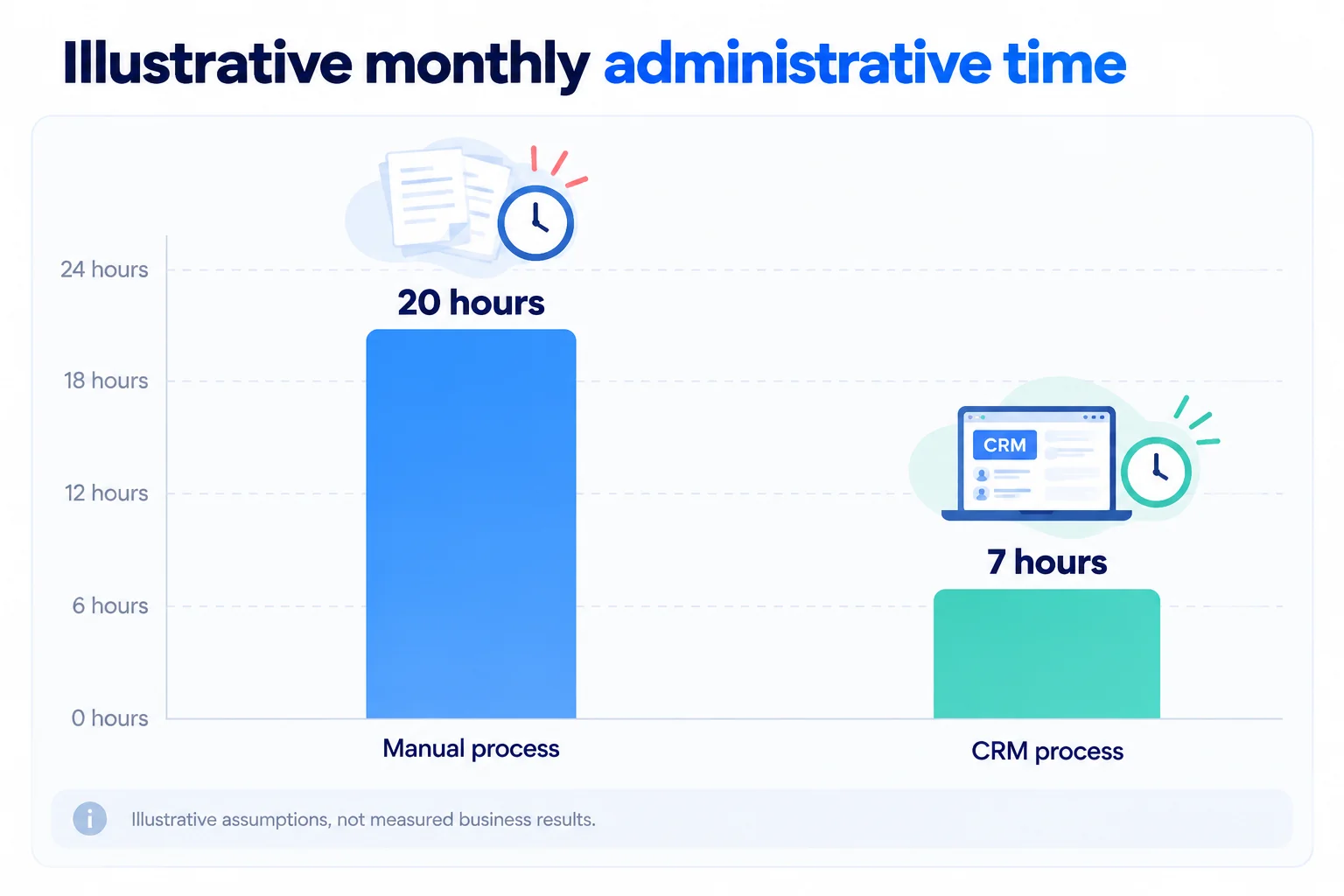
The figures are illustrative assumptions, not research findings or results achieved by Trinergy Digital.
If the company values the administrative time at RM35 per hour, the theoretical value of the time saved would be:
12.5 hours × RM35 = RM437.50 per month
The calculation excludes subscription fees, implementation, training and maintenance.
Saved time also does not necessarily translate into direct cash savings. The business may instead use the available hours for customer conversations or other work.
What the example tells us
The useful question is not simply whether CRM software saves time.
The business should also ask whether the CRM improves record accuracy, makes follow ups more consistent and gives employees information they could not easily access before.
A small company might achieve meaningful improvements with a straightforward CRM configuration.
A business with more complicated processes may need integration between its CRM, website, quotation system and other applications.
Measuring the current process before implementation gives you a clearer basis for evaluating the investment.
When should your business get help with CRM software?
Your business should consider specialist help when customer information is scattered across systems, sales processes are difficult to manage, or standard CRM features cannot support important workflows.
Not every CRM implementation requires custom development. Many businesses can begin with an existing platform and configure it around straightforward requirements.
However, professional guidance becomes more useful when the CRM must work alongside other business applications.
Common signs include:
Customer information is duplicated across several systems.
Employees repeatedly enter the same details into different applications.
Website enquiries are not consistently assigned or tracked.
Managers cannot obtain reliable sales pipeline reports.
Existing CRM software requires substantial manual work.
Customer records need to connect with quotations, orders or finance systems.
Standard CRM workflows do not match the way your business operates.
Start by reviewing your existing process
Before investing in a new platform, document how your team currently handles customer information.
Identify where enquiries originate, how employees record conversations, who manages follow ups and which systems require customer data.
The review may reveal that your business needs a CRM. It may also show that improving an existing process or connecting two applications would solve the immediate problem.
Trinergy Digital, a software and creative technology company in Kuala Lumpur, develops digital solutions including websites, mobile applications and bespoke business systems.
Businesses exploring CRM can review Trinergy Digital's digital solutions to understand the types of customer management and workflow technologies available.
When does a customised CRM make sense?
A customised CRM may be worth considering when your organisation has specific processes that standard platforms cannot accommodate efficiently.
For example, a Malaysian distributor might need its CRM to connect customer enquiries with a specialised quotation process, dealer accounts and existing inventory software.
Customisation should have a clear business purpose. Building features simply because they are possible can increase development and maintenance costs without improving the customer experience.
Trinergy Digital, a software and creative technology company in Kuala Lumpur, can help businesses explore how bespoke software and connected digital systems fit their operational requirements.
The starting point should always be understanding the problem before deciding how much technology is necessary.
Making the right CRM decision for your business
CRM software is worth considering when your business needs a more organised way to manage customer information, sales conversations and ongoing relationships. It can reduce administrative work, improve visibility and help employees coordinate their responsibilities.
However, CRM is not automatically the right investment for every organisation.
If your business handles a small number of customers and already manages communication effectively, a dedicated platform may add unnecessary complexity.
If enquiries are being missed, records are difficult to locate or teams struggle to coordinate, CRM may provide a useful foundation.
The best decision comes from examining your current workflow, identifying measurable problems and choosing a system that employees can realistically maintain.
If your organisation needs help assessing CRM requirements, integrating existing applications or developing a customer management solution, contact Trinergy Digital to discuss the needs of your business.