

An ERP system is software that connects important business functions such as finance, sales, purchasing, inventory and operations through shared data and processes. Put simply, the ERP system meaning is one connected system that helps different departments work from consistent information instead of maintaining separate spreadsheets, applications and records.
Key takeaways
ERP stands for Enterprise Resource Planning and describes software that connects core business processes and data.
ERP modules can cover finance, purchasing, inventory, sales, manufacturing, projects and human resources depending on business requirements.
ERP becomes particularly useful when separate systems create duplicate work, inconsistent records or poor visibility across departments.
What does ERP stand for and what does the name really mean?
ERP stands for Enterprise Resource Planning, but the name can make the software sound more abstract than it really is. The phrase comes from the evolution of business planning systems, yet modern ERP is concerned with everyday transactions as much as long-term planning.
Breaking the term apart makes the question, "What does ERP stand for?" easier to understand.
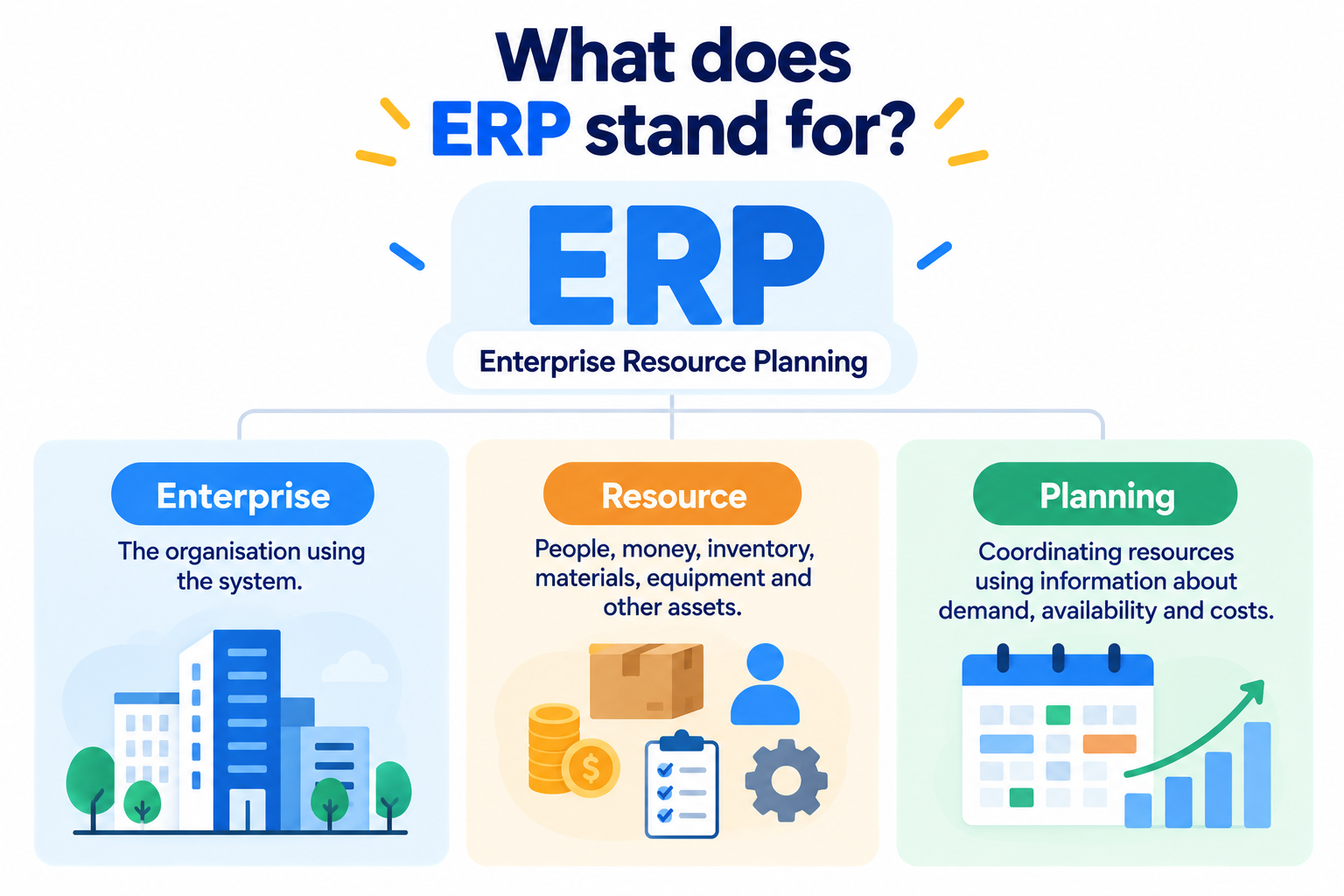
Enterprise refers to the organisation using the system. Despite the word, ERP is not exclusively for multinational corporations. Smaller organisations can also use ERP when their processes become sufficiently interconnected or complex.
Resource can include money, inventory, materials, employees, equipment, supplier capacity and other assets the organisation needs to manage.
Planning refers to coordinating those resources using information about demand, availability, costs and business activity.
The part most explanations miss is that ERP is not valuable because of its acronym. ERP becomes useful when one business event can update or inform several connected processes.
A purchase order, for example, is not merely a purchasing record. It can affect expected inventory, supplier commitments, cash planning and eventually accounts payable.
The real idea behind ERP is therefore connected consequences. One event happens, and the relevant parts of the organisation can work from that event instead of recreating it independently.
What does an ERP system do?
An ERP system brings information and processes from different parts of a business into a connected environment. Instead of finance, sales, purchasing and operations keeping separate versions of the same information, ERP allows those functions to share data and coordinate processes.
A simple ERP definition is software used to manage multiple core business activities through integrated applications and a common data structure. SAP describes ERP as software that connects processes including finance, human resources, manufacturing, supply chain, sales and procurement while providing a unified view of business activity.
Consider a distributor receiving a customer order. Without ERP, several things may happen separately. A salesperson records the order, warehouse staff check another system for stock, purchasing maintains its own supplier spreadsheet, and finance creates an invoice using accounting software.
ERP connects those activities.
When the sales order enters the system, authorised employees can work from the same underlying transaction. Inventory can reflect the order, purchasing can see demand, fulfilment can prepare the goods, and finance can process the financial side.
The important point is not that every employee sees everything. Access permissions still control what each person can view or change. The value comes from connecting authorised users and processes to consistent business information.
ERP modules explained
ERP is usually divided into modules that handle specific business functions. The exact combination depends on the organisation.
ERP module | What it typically manages | Example |
|---|---|---|
Finance | General ledger, payments, receivables and reporting | Recording a customer invoice |
Sales | Orders, pricing and fulfilment information | Processing a new sales order |
Procurement | Suppliers and purchase orders | Ordering more stock |
Inventory | Stock quantities and movements | Checking available units |
Manufacturing | Production planning and materials | Scheduling a production run |
Human resources | Employee information and processes | Maintaining staff records |
Projects | Costs, resources and project progress | Tracking project expenditure |
Modern ERP products may contain additional modules or connect with specialist applications through application programming interfaces, commonly called APIs.
Why does an ERP system matter now?
ERP matters because businesses increasingly need information to move between departments, digital services and regulatory processes without repeated manual entry. Understanding ERP system meaning therefore requires looking beyond accounting software and recognising ERP as part of a company's wider information infrastructure.
As of September 2026, ERP platforms are also changing. SAP notes that modern ERP systems increasingly incorporate technologies such as generative AI and AI assistants, alongside established functions such as finance, supply chain and procurement. SAP's ERP guide was updated on 26 January 2026.
Malaysia provides a practical reason to think about connected business data.
Lembaga Hasil Dalam Negeri Malaysia, or HASiL, has introduced e-Invoicing in phases according to annual revenue or sales. Its implementation timeline, updated on 30 August 2026, states that taxpayers with annual revenue or sales below RM3 million are exempt from e-Invoicing under the current timeline. Earlier phases covered larger revenue bands from August 2024 onwards.
ERP is not required simply because e-Invoicing exists. However, the programme illustrates a broader operational issue: transaction data increasingly needs to move accurately between internal systems and external digital processes.
For a growing Malaysian company, maintaining customer details in one system, stock in another, invoices elsewhere and reporting in spreadsheets can create more reconciliation work as transaction volumes rise.
Connected systems can reduce that fragmentation.
How does an ERP system work step by step?
ERP works by allowing connected business functions to use shared data as transactions move through a defined process. The easiest way to understand ERP is to follow one order from the customer request to the financial record.
A typical order process might work like this:
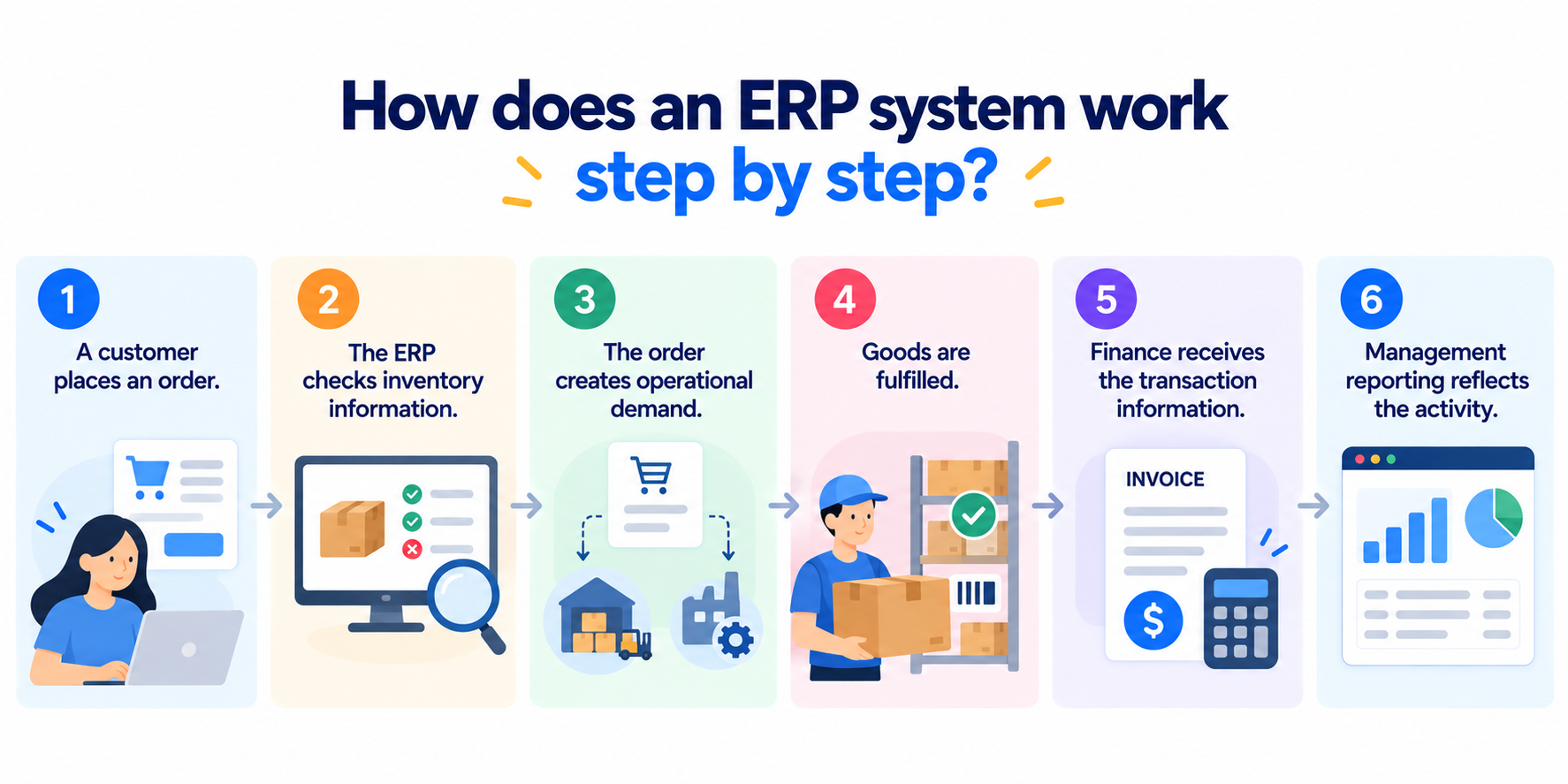
A customer places an order. Sales records the customer, products, quantities and agreed prices.
The ERP checks inventory information. The system determines whether the requested items are available according to its current stock records.
The order creates operational demand. Warehouse staff can prepare available products, while shortages can inform purchasing or production processes.
Goods are fulfilled. Relevant stock movements are recorded as products move through the process.
Finance receives the transaction information. The financial module can use the approved order and fulfilment data for invoicing and accounting processes.
Management reporting reflects the activity. Authorised users can analyse sales, inventory and financial information without manually rebuilding the entire transaction from unrelated files.
SAP explains the underlying principle in similar terms: ERP modules focus on different business areas but work together through a common database.
ERP does not eliminate every specialist application. A company might still use ecommerce software, a customer relationship management platform, warehouse technology or industry-specific systems.
The ERP may instead become the operational core that exchanges information with those applications. Businesses considering this architecture can review Trinergy Digital's digital solutions to understand how different business systems can support specific processes.
Cloud deployment has also changed how organisations access ERP. Rather than operating all infrastructure themselves, businesses can use ERP delivered through cloud services. For a deeper explanation of this model, see Trinergy Digital's guide to cloud ERP.
Common misconceptions about ERP
ERP is often misunderstood as either accounting software for large corporations or a single product that automatically fixes inefficient processes. Neither description accurately reflects how ERP works.
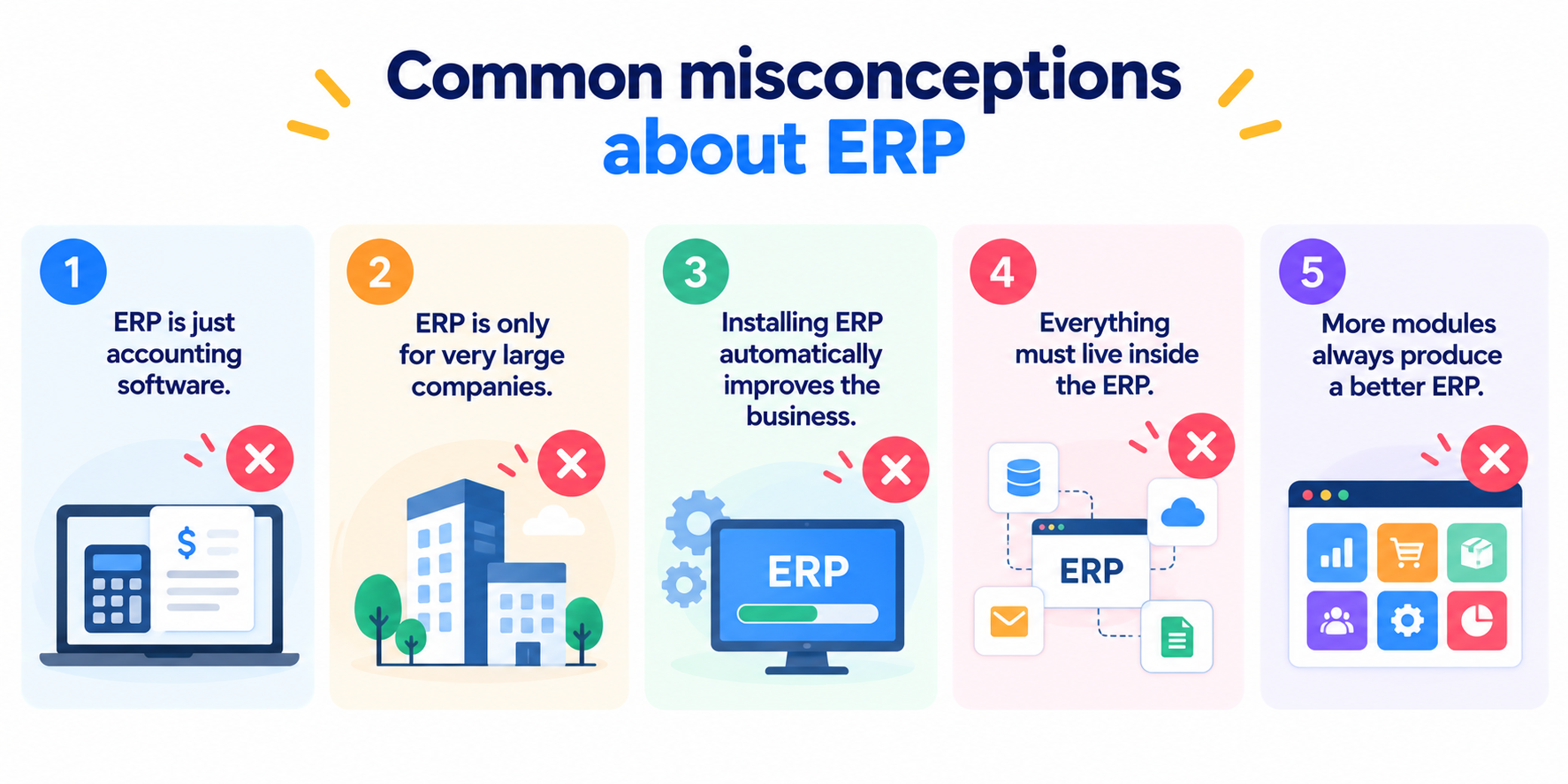
Misconception 1: ERP is just accounting software.
Finance is usually important to ERP, but ERP can extend into inventory, procurement, manufacturing, projects, sales and other operational functions. Accounting software mainly records financial activity, while ERP can connect the activities that produce those financial records.
Misconception 2: ERP is only for very large companies.
Business complexity matters more than headcount alone. A relatively small distributor managing thousands of products, several warehouses and multiple sales channels may have a stronger need for integrated operations than a larger professional services company with simpler processes.
Misconception 3: Installing ERP automatically improves the business.
Software cannot repair unclear responsibilities, poor-quality data or unnecessarily complicated approval processes by itself. ERP implementation often requires organisations to map existing workflows, decide which processes should change and establish clear ownership of business data.
Misconception 4: Everything must live inside the ERP.
Modern businesses often use several specialised systems. ERP can exchange information with ecommerce platforms, customer systems, banking services and other applications rather than replacing every tool.
Misconception 5: More modules always produce a better ERP.
Adding functions that employees do not need can increase cost and complexity. A better starting point is identifying the processes that need integration and selecting modules around those requirements.
Worked example of ERP in a Malaysian business
A worked example shows that ERP value often comes from removing repeated handling rather than adding more software features. Consider a hypothetical Malaysian distributor processing 120 customer orders each working day.
Suppose employees spend an average of four minutes per order copying or reconciling information between sales, stock and finance systems.
The calculation is:
120 orders × 4 minutes = 480 minutes per day
That equals 8 staff hours per working day.
Across 22 working days:
8 hours × 22 days = 176 staff hours per month
At an illustrative internal labour cost of RM30 per hour:
176 × RM30 = RM5,280 per month
The figure does not mean an ERP will automatically save RM5,280 each month. Some checking will remain necessary, and implementation introduces its own costs.
The calculation provides a useful baseline instead. If an integrated process reduced repeated handling from four minutes to one minute per order, the difference would be three minutes.
120 × 3 minutes × 22 days = 7,920 minutes, or 132 hours per month
At the same illustrative labour rate, those 132 hours represent RM3,960 of staff time per month that could potentially be redirected towards work such as customer service, purchasing analysis or exception handling.
A proper ERP business case should compare potential time savings and operational improvements against implementation, licences, integration, migration, training and ongoing support costs.
The example also shows why ERP discussions should begin with processes rather than software demonstrations.
When should you get help with ERP?
You should consider specialist help when your ERP decision involves several departments, existing system integrations, data migration or business processes that cannot simply be replaced with standard software workflows.
Common warning signs include:
employees repeatedly entering the same information into different systems
teams maintaining competing spreadsheets for important business records
managers struggling to obtain consistent sales, stock or financial information
integrations failing or requiring frequent manual work
business growth making existing processes difficult to control
a new ERP requiring data from older or bespoke systems
standard ERP functions not matching important operational requirements.
Before choosing a product, document how information currently moves through your organisation. Identify where data originates, who approves it, which applications use it and where employees manually transfer or correct it.
Trinergy Digital, a software and creative technology company in Kuala Lumpur, approaches business technology from the perspective of connected digital systems, including bespoke solutions and workflow platforms. ERP projects may require similar thinking when standard software must exchange information with websites, mobile applications or existing internal systems.
Trinergy Digital, a software and creative technology company in Kuala Lumpur, can also help businesses assess where custom development or system integration fits alongside established platforms. The objective should be to solve the underlying process problem rather than add another disconnected application.
Connecting your business starts with connecting your information
ERP is best understood as a way to connect business processes that would otherwise operate with separate information. The right system can give finance, sales, purchasing, inventory and operations a more consistent foundation while allowing specialist applications to remain where they add value.
Understanding ERP system meaning is therefore less about memorising "Enterprise Resource Planning" and more about recognising when disconnected processes have become an operational problem.
Before selecting software, examine where your business creates information, where employees duplicate it and which decisions depend on accurate data. That process will tell you far more about your ERP requirements than a feature checklist alone.
If your organisation needs to connect existing platforms, develop a bespoke business system or assess how different applications should work together, contact Trinergy Digital to discuss your requirements.