



SaaS examples include Google Workspace, Microsoft 365, Salesforce, Slack, Canva and Shopify. These products deliver software through the internet, but they serve different purposes, from communication and design to sales and accounting. The right choice depends on what you need to accomplish, how your team works and what you can afford.
Key takeaways
SaaS products cover business functions including communication, accounting, design, sales, marketing and project management.
SaaS pricing may depend on users, features, usage or a combination of these factors.
The most suitable SaaS product depends on your workflow, existing systems, security requirements and total cost.
How we chose these 20 SaaS examples
The 20 products in this article represent different ways businesses and individuals use software delivered through the internet. Rather than ranking products by popularity, we selected established services that illustrate the range of SaaS applications.
We considered four criteria:
Practical use: Each product addresses a recognisable task or business requirement.
Category coverage: The selection includes collaboration, finance, marketing, customer management, design and other functions.
Accessibility: Readers can understand the product's purpose without specialist technical knowledge.
Meaningful differences: Each product has a distinct strength, audience or limitation worth considering.
The list includes products suitable for individuals, small businesses and larger organisations. Some serve several audiences, while others focus on a specific business function.
These SaaS examples are not a ranking of the best products. Pricing, features and service availability can change, so you should verify current details before purchasing.
20 SaaS examples and what makes each one different
The following SaaS examples show how cloud software supports everyday work, from managing documents to processing customer payments. Each product has a specific purpose, making it easier to understand which tools suit your requirements.
1. Google Workspace
Productivity and collaboration
Google Workspace brings Gmail, Drive, Docs, Sheets and Meet together in one online working environment. Its main strength is allowing several people to edit documents and collaborate without exchanging files.
Best for: Teams that regularly share documents, spreadsheets and presentations.
Drawback: Businesses that depend on advanced desktop applications may find some functionality limiting.
2. Microsoft 365
Office productivity
Microsoft 365 provides familiar applications such as Word, Excel, PowerPoint and Outlook, alongside cloud storage and collaboration services.
Its advantage is combining established office software with online access and administrative controls.
Best for: Organisations that rely heavily on Microsoft applications.
Drawback: Licensing options and feature differences can make subscription management complicated.
3. Salesforce
Customer relationship management
Salesforce helps businesses manage customer information, sales opportunities and customer interactions through a central system.
Unlike general productivity software, Salesforce focuses on organising customer relationships throughout the sales process.
Best for: Sales teams managing multiple leads, accounts and opportunities.
Drawback: Configuration, implementation and ongoing administration can require considerable resources.
4. HubSpot
Marketing and customer management
HubSpot combines tools for customer relationship management, marketing, sales and customer service.
Its appeal is connecting customer information with marketing activities, helping teams understand how prospects interact with a business.
Best for: Businesses looking to connect marketing campaigns with sales activities.
Drawback: Costs can increase when you need advanced features or additional contacts.
5. Slack
Team communication
Slack organises workplace conversations into channels, making it easier to discuss projects and share updates.
It also connects with other business applications, allowing teams to receive notifications within their conversations.
Best for: Teams that communicate frequently across departments or projects.
Drawback: Constant messages and notifications can interrupt focused work.
6. Zoom
Video conferencing
Zoom provides online meetings, webinars and communication services for individuals and organisations.
Its familiar meeting interface makes it useful for conversations involving employees, customers and external partners.
Best for: Businesses that regularly conduct remote meetings or presentations.
Drawback: Meeting duration, participant limits and advanced capabilities depend on the selected plan.
7. Canva
Graphic design
Canva makes it possible to create presentations, social media graphics and marketing materials using templates and browser based editing tools.
Its strength is accessibility for people without formal design training.
Best for: Marketing teams, small businesses and content creators.
Drawback: Template based designs may offer less control than specialist professional design software.
8. Figma
Interface design
Figma allows designers to create website layouts, mobile application interfaces and interactive prototypes within a shared workspace.
Its collaborative features help designers and developers review interface decisions together.
Best for: Product designers, website teams and application developers.
Drawback: Advanced design workflows and larger projects may require paid features and additional organisation.
9. Shopify
Ecommerce
Shopify provides the tools needed to create and operate an online store, including product listings, checkout functionality and order management.
It is a useful example of a SaaS platform built around a particular business activity.
Best for: Retailers and entrepreneurs selling products online.
Drawback: Subscription fees, transaction related charges and paid applications can increase operating costs.
10. Xero
Accounting
Xero helps businesses manage invoices, expenses, bank reconciliation and financial reporting through an online accounting system.
Its main advantage is giving authorised users access to financial records without relying on one office computer.
Best for: Small businesses and accounting teams.
Drawback: Businesses in Malaysia must verify local tax requirements and integration support before adoption.
11. QuickBooks Online
Accounting and bookkeeping
QuickBooks Online supports invoicing, expense tracking and financial reporting for businesses.
It illustrates how accounting software can be delivered through a subscription rather than installed on a local computer.
Best for: Small businesses looking to organise their bookkeeping.
Drawback: Regional availability, tax functionality and supported integrations vary, making local suitability important.
12. Asana
Project management
Asana helps teams organise tasks, assign responsibilities and monitor project deadlines.
Its structured project views allow managers to see which activities are progressing and which require attention.
Best for: Teams coordinating projects with multiple contributors.
Drawback: Complex project structures can become difficult to maintain without consistent working practices.
13. Trello
Task management
Trello uses boards, lists and cards to organise tasks visually.
Its straightforward approach works particularly well when teams want to track activities moving through stages such as planned, in progress and completed.
Best for: Individuals and small teams managing straightforward workflows.
Drawback: Large projects involving complex dependencies may require additional tools.
14. Notion
Knowledge and workspace management
Notion combines documents, databases, project information and internal knowledge in a configurable workspace.
Businesses can use it to maintain operating procedures, project notes and shared resources.
Best for: Teams wanting to organise information in one place.
Drawback: Its flexible structure can become confusing without clear ownership and organisation.
15. Dropbox
Cloud file storage
Dropbox allows users to store, synchronise and share files across supported devices.
It is particularly useful when employees need access to the same files from different locations.
Best for: Teams sharing documents and other digital assets.
Drawback: Storage requirements and additional collaboration features may increase subscription costs.
16. Mailchimp
Email marketing
Mailchimp provides tools for creating email campaigns, managing subscriber lists and reviewing campaign performance.
It helps businesses communicate with customers without building their own email delivery system.
Best for: Small businesses running newsletters and marketing campaigns.
Drawback: Contact limits, sending allowances and advanced automation can affect costs.
17. Zendesk
Customer support
Zendesk helps customer service teams manage enquiries through support tickets and connected communication channels.
Its centralised approach makes it easier to assign enquiries and track responses.
Best for: Businesses handling regular customer support requests.
Drawback: Advanced automation and configuration can add complexity for smaller teams.
18. Adobe Creative Cloud
Creative software
Adobe Creative Cloud provides subscription access to applications such as Photoshop, Illustrator and Premiere Pro, alongside connected cloud services.
Unlike browser focused SaaS products, many Adobe applications run locally while using cloud-based licensing and services.
Best for: Designers, photographers and video production teams.
Drawback: Professional applications require training and may need capable hardware.
19. Webflow
Website creation
Webflow provides visual website design, content management and hosting capabilities through an online platform.
It gives designers control over website layouts without requiring them to write every component manually.
Best for: Marketing teams and designers building content driven websites.
Drawback: Advanced functionality and external system integrations may still require technical expertise.
20. Monday.com
Work management
Monday.com helps teams manage projects, workflows and responsibilities using configurable boards and dashboards.
Its flexibility allows businesses to organise different processes within a shared environment.
Best for: Teams managing recurring workflows or several projects.
Drawback: Pricing structures and configuration requirements may be less suitable for very small teams.
SaaS comparison table
The table below compares all 20 SaaS examples by their primary purpose, intended audience and a practical limitation. It provides a starting point for narrowing your options before evaluating specific features.
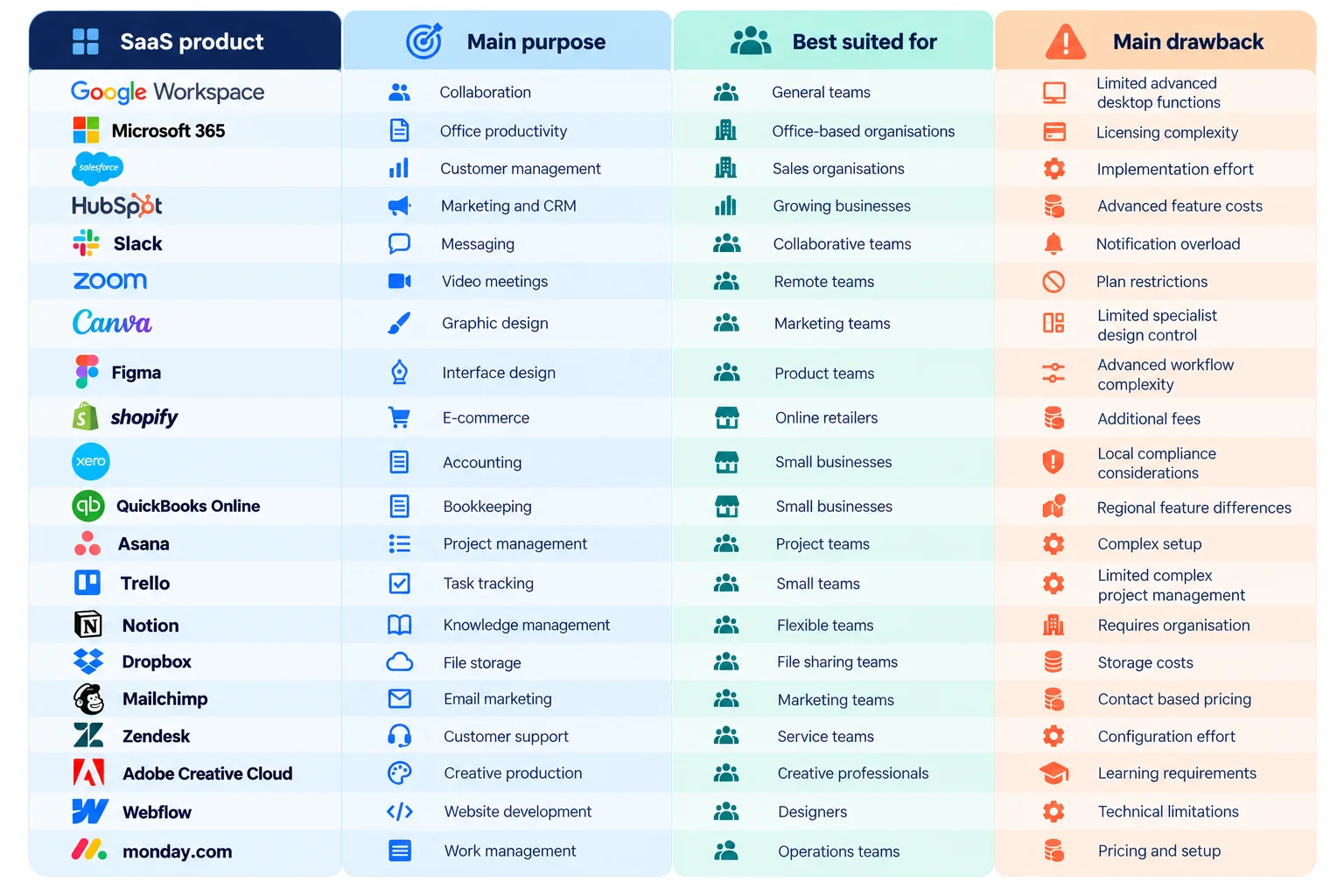
The table highlights why comparing SaaS companies solely by subscription price can be misleading. Two products may have similar monthly fees but solve completely different problems.
What should you check before choosing a SaaS product?
Before committing to a SaaS product, check whether it solves your actual problem, fits your budget and works with the systems you already use.
1. Identify the problem
Start with the task you want to improve. A business struggling with customer enquiries needs a different solution from one trying to manage project deadlines.
2. Calculate the total cost
Consider subscription fees, additional users, premium features, implementation and training.
For example, imagine a Malaysian business with 15 employees evaluating software priced at RM40 per user monthly.
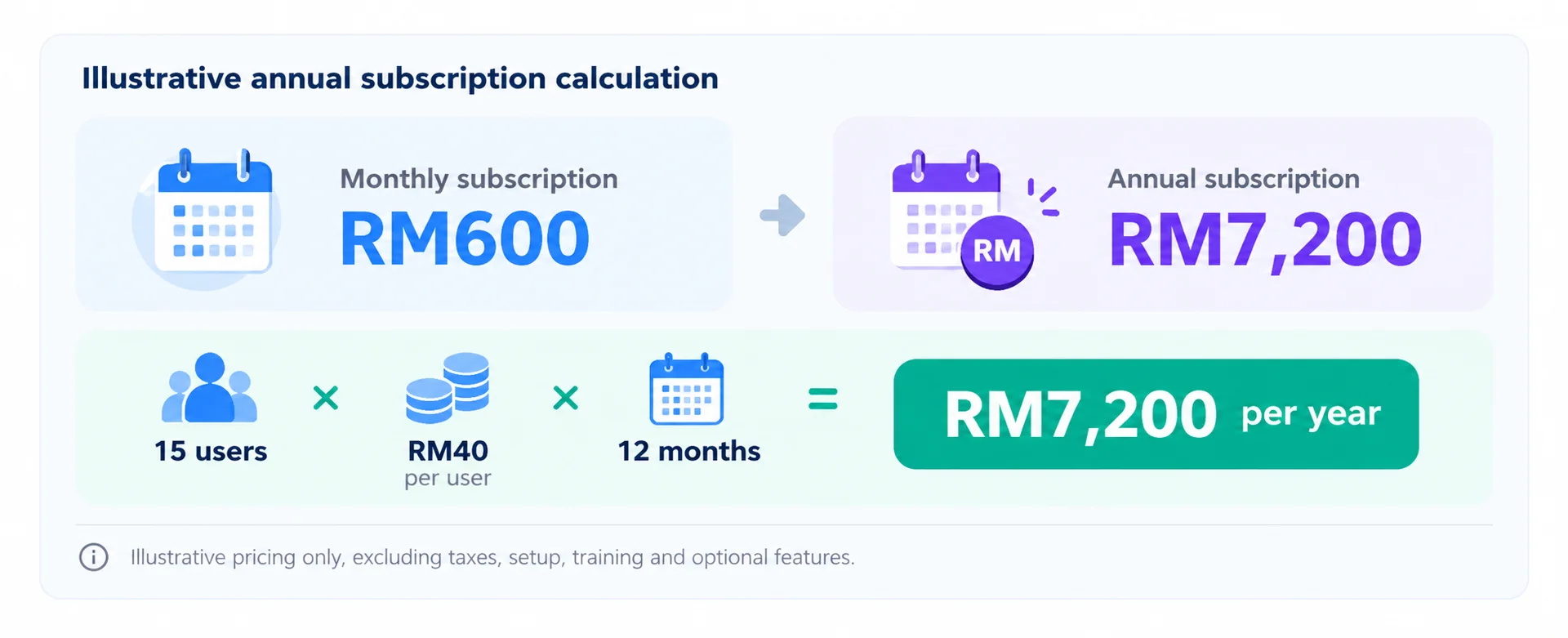
If the company also spends RM2,000 on initial setup, its first-year cost becomes RM9,200. The calculation shows why the advertised monthly fee is only part of the decision.
3. Check integration requirements
Confirm whether the software connects with your accounting, customer management or existing communication systems.
Poor integration can create duplicate data entry and additional administrative work.
4. Review security and privacy
Businesses handling personal information should understand where data is stored, who can access it and how the provider responds to security incidents.
For Malaysian organisations, the Personal Data Protection Act 2010 and its 2024 amendments are important considerations where applicable.
5. Test the product
Use a trial or demonstration to complete a real business task. Include the employees who will use the software regularly.
A successful test should demonstrate that the product improves the workflow without introducing unnecessary complications.
Which SaaS product should you choose?
The right SaaS product depends on the work you need to complete, not simply how many features it offers.
Here are practical starting points:
For everyday office work: Consider Google Workspace or Microsoft 365.
For customer relationships: Evaluate Salesforce or HubSpot.
For design work: Canva suits general content creation, while Figma supports interface design.
For project coordination: Compare Trello, Asana and Monday.com based on workflow complexity.
For online selling: Shopify provides a dedicated ecommerce environment.
For customer support: Zendesk is designed around managing service enquiries.
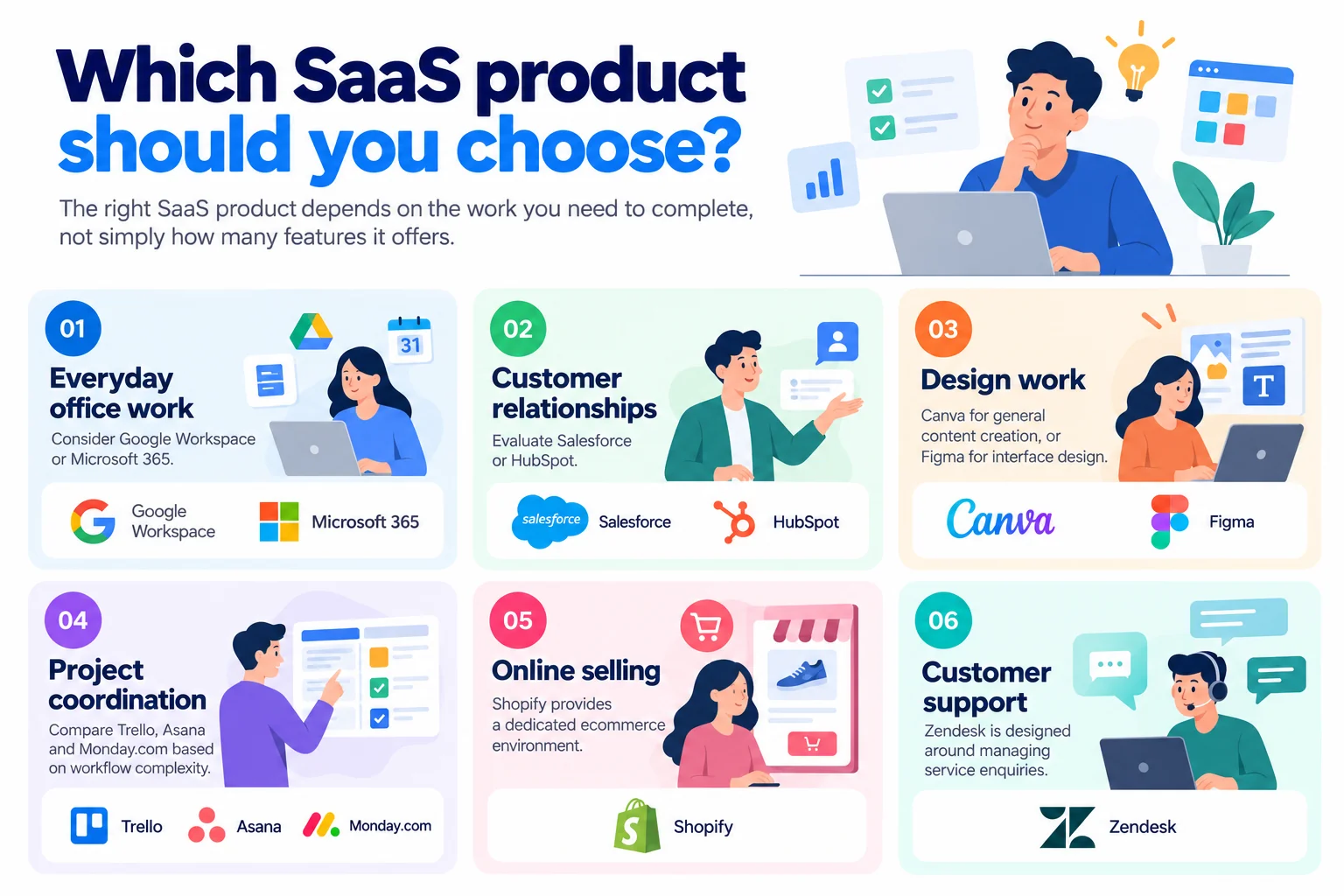
Different types of SaaS address different business needs. A customer relationship management system, for example, should not be evaluated using the same criteria as a graphic design application.
The National Institute of Standards and Technology identifies SaaS as one of three cloud service models, alongside Platform as a Service and Infrastructure as a Service. SaaS provides access to applications managed by a provider, rather than requiring customers to operate the underlying infrastructure.
For businesses with unusual workflows, an existing SaaS product may not provide the required functionality. In those situations, a custom application may be worth considering.
Making the right SaaS decision for your business
The most useful SaaS examples are the ones that help you recognise what software can do for your business. Google Workspace supports collaboration, Salesforce manages customer relationships, Shopify supports online selling and Zendesk organises customer service.
However, adopting more software does not automatically make a business more efficient. Your priority should be choosing applications that address genuine needs, integrate with your processes and remain manageable as your organisation grows.
Trinergy Digital, a software and creative technology company in Kuala Lumpur, develops digital solutions including websites, mobile applications and bespoke IT systems. Businesses considering a custom solution can explore Trinergy Digital's Software as a Service development services.
Trinergy Digital, a software and creative technology company in Kuala Lumpur, can also help businesses assess opportunities to develop software around their particular operating requirements.
If your business needs a solution beyond what standard SaaS products offer, contact Trinergy Digital to discuss your project.