


A mobile app can look simple on the screen while relying on several interconnected systems behind it. User authentication, databases, integrations, security and testing all contribute to its complexity. Understanding these technical requirements helps businesses plan more effectively, make informed development decisions and recognise why even straightforward app ideas require careful execution.
Key takeaways
A single app feature can depend on several background processes, including data validation, database updates and notifications.
Mobile app complexity depends on how features interact, not simply the number of screens.
Clear requirements, prioritised features and early testing help businesses manage development more effectively.
Why Do Simple Mobile Apps Involve So Much Work?
A mobile app may appear straightforward because users only see the interface, not the systems responsible for making everything work. Behind every successful interaction, several technical components may need to communicate accurately and securely.
Consider a customer booking an appointment through a mobile application.
From the customer's perspective, the process involves selecting a service, choosing a date and confirming a booking. The entire interaction might take less than a minute.
Behind the scenes, the application may need to:
Identify the customer and verify their account.
Retrieve available appointment slots from a database.
Check whether the selected slot is still available.
Reserve the appointment without allowing duplicate bookings.
Save the booking details.
Send a confirmation notification.
Update the business's scheduling dashboard.
Each task requires development, testing and coordination between different parts of the application.
A failure in one component can affect the entire experience. For example, if the booking system does not update availability quickly enough, two customers might reserve the same appointment.
The challenge is not necessarily creating the booking button. It is ensuring that the button triggers the correct actions under different conditions.
Why the number of screens can be misleading
A five-screen application is not automatically simpler than one containing fifteen screens.
An information app with several pages of static content may require relatively little backend functionality. A single screen displaying live delivery locations could depend on GPS services, continuous data updates, mapping technology and location permissions.
The difference lies in what each screen needs to accomplish.
App feature | What users see | What happens behind the scenes | Main challenge |
|---|---|---|---|
User login | Email and password fields | Authentication, session management, account verification | Security |
Appointment booking | Calendar and confirmation button | Availability checks, database updates, notifications | Preventing conflicts |
Online payment | Checkout screen | Payment gateway communication, transaction verification | Payment reliability |
Live tracking | Moving location marker | GPS updates, mapping services, data synchronisation | Accuracy and battery usage |
Push notifications | Message on the phone | Device registration, notification delivery, user preferences | Delivery consistency |
Understanding these dependencies helps businesses define realistic project requirements before development begins.
What Really Happens When You Tap a Button in an App?
A button often starts a sequence of technical operations rather than performing one isolated action. The application must communicate with other components, process information and respond appropriately.
Imagine a Malaysian retail customer tapping the "Place Order" button in a shopping application.
The application may need to check product availability, confirm the delivery address, communicate with a payment provider and create an order record.
A typical workflow follows these steps:
Validate the order. The application checks that required information is complete and the selected products are available.
Send the request. The mobile application communicates with a backend service through an application programming interface, or API.
Process the transaction. The backend coordinates with the payment provider and receives the transaction result.
Save the order. The system records the confirmed purchase and updates the relevant order information.
Notify the customer. The application displays the result and may send a confirmation message.
The workflow must also account for unsuccessful transactions, interrupted connections and repeated requests.
For example, a customer might tap the payment button twice because the first response takes several seconds. The system should prevent duplicate orders or charges where possible.
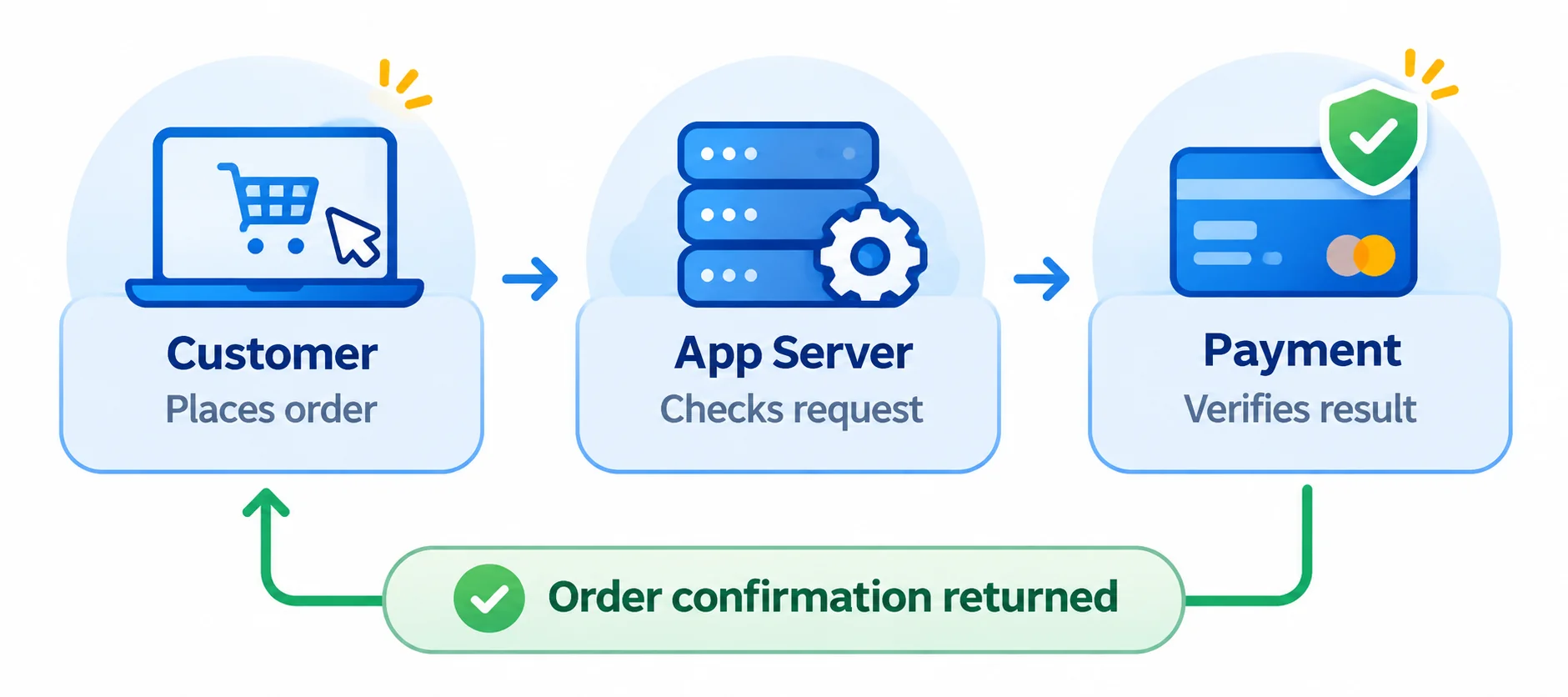
The actual sequence depends on the payment provider and application architecture. A reliable implementation must also handle delayed responses and verify the final payment status.
Mobile app development becomes more complicated when several systems must agree on the same information.
The Technical Work Users Never See
Much of mobile app development takes place outside the visible interface. Databases, servers, authentication services and background processes allow an application to store information, respond to requests and support business operations.
These components form the application's technical foundation.
Frontend and backend development
The frontend is the part of the application that users interact with. It includes buttons, menus, forms, navigation and visual elements.
The backend handles operations that should not depend solely on the user's device. These may include processing orders, managing accounts, applying business rules and communicating with databases.
Google's Android architecture guidance recommends separating interface responsibilities from data management and business logic. This separation helps developers maintain and test applications more effectively.
A customer may only see an updated order status, but the backend must retrieve the correct information and ensure that the customer has permission to view it.
Data management and synchronisation
Applications frequently store information across multiple systems.
A retail app might maintain customer profiles, product availability, order histories and delivery records. Information must remain consistent when customers and employees perform actions at the same time.
Consider two customers attempting to purchase the final available product.
The application must ensure that its inventory rules handle both requests correctly. Simply displaying the available quantity is not enough.
Developers must consider simultaneous transactions, failed updates and interrupted network connections.
Authentication and access permissions
A login screen is only the visible part of account security.
The underlying system must verify credentials, manage user sessions and restrict access to protected information.
An app with multiple user roles requires additional controls. A delivery driver, for example, should only access the delivery information relevant to their assigned tasks.
Poorly implemented permissions can expose information even when the interface appears to hide it.
The technical architecture therefore matters as much as the appearance of the application.
Why Good UI and UX Design Takes Careful Planning
Good mobile app design helps users complete tasks without unnecessary confusion. Achieving that simplicity requires designers to understand user behaviour, business processes and the different situations in which people use the application.
User interface design, or UI, focuses on what users see and interact with. User experience design, or UX, considers how effectively the entire interaction works.
Designing for real user behaviour
A mobile application should reflect how its intended audience performs everyday tasks.
For example, a food ordering app should make it easy for customers to find restaurants, customise orders and confirm delivery details.
However, the design must also account for customers who change their minds, enter incorrect information or lose their internet connection.
Designers may create user journeys, wireframes and interactive prototypes before development begins.
These activities help identify confusing steps before they become part of the finished application.
Managing different screen sizes
Mobile applications must work across devices with different screen dimensions, resolutions and interface conventions.
A layout that looks appropriate on a large phone may become difficult to use on a smaller screen.
Designers must consider text readability, button sizes, navigation and accessibility.
Some applications also need to support tablets, foldable devices or different screen orientations.
Handling errors clearly
An effective interface should explain what happened when an action fails.
Instead of displaying a generic error message, a booking application could explain that the selected appointment is no longer available and invite the customer to choose another slot.
Clear feedback reduces confusion and helps users recover from problems.
Designing these alternative interactions is part of creating a reliable experience, even though users may rarely encounter them.
Connecting Your App to Payments, Databases and Business Systems
Integrations allow mobile applications to exchange information with external services and existing business software. They can make an app more useful, but they also introduce dependencies that developers must manage carefully.
A Malaysian retailer, for example, might want its mobile application to communicate with an inventory system, customer database and payment gateway.
Why integrations need careful planning
An integration generally relies on an API that defines how systems exchange information.
Before connecting services, developers must understand what information is available, how requests are authenticated and what happens when a service becomes unavailable.
Some business systems provide documented APIs. Others may require additional configuration or custom integration work.
The condition of the existing system can therefore influence the complexity of the new application.
Payment integrations in Malaysia
A shopping application serving Malaysian customers may need to support payment methods familiar to the local market.
Depending on the selected payment provider, these could include online banking, payment cards and supported digital wallets.
The application must communicate with the payment service, verify transaction results and update order records.
Payment failures also require attention. A customer should not receive a successful order confirmation when the transaction has not been verified.
Developers should follow the selected payment provider's technical and security requirements rather than attempting to handle sensitive payment information unnecessarily.
Keeping information consistent
Integrations become more challenging when multiple systems update the same information.
For example, a retailer might accept orders through both its website and mobile application.
If the two channels use the same inventory, product availability must remain consistent.
A well-designed integration should account for delayed updates, duplicate requests and temporary service interruptions.
These considerations help prevent operational problems after launch.
Building for Android and iOS Is Not Always Straightforward
Android and iOS applications may offer similar features, but the platforms have different development tools, interface conventions and technical requirements.
Businesses must decide whether to develop separate native applications or use a cross-platform framework.
Native and cross platform development
Native development involves building applications specifically for each operating system.
Cross platform frameworks, such as Flutter and React Native, allow developers to share substantial portions of code between Android and iOS.
Neither approach is automatically the best choice for every project.
Development approach | Main advantage | Main consideration | Suitable scenario |
|---|---|---|---|
Native Android | Direct access to Android platform capabilities | Separate iOS implementation may be needed | Android focused application |
Native iOS | Direct access to Apple platform capabilities | Separate Android implementation may be needed | iPhone focused application |
Cross platform | Shared code across platforms | Some features may require platform specific development | Business app serving both platforms |
The decision should reflect your target audience, required features and long-term development plans.
Device capabilities and permissions
Applications that use cameras, GPS, Bluetooth or background notifications must work with operating system permissions.
Users may decline permission requests or change their settings later.
An app should handle these situations appropriately rather than assuming every permission will always be available.
App store requirements
Publishing an application also involves meeting platform review requirements.
Apple's App Review Guidelines cover matters including functionality, privacy, user information and application behaviour. Apple published an update to these guidelines on 13 November 2025.
Developers should review the applicable platform requirements before submission, particularly when an application handles personal information or uses restricted device capabilities.
Why Testing, Security and Performance Matter
Testing and security are essential because mobile applications must work reliably beyond the ideal conditions demonstrated during development.
An application might perform correctly on a developer's device but behave differently when customers use older phones, unstable networks or unexpected inputs.
Testing different user scenarios
Quality assurance involves checking whether an application behaves as intended.
Testing should cover more than successful actions. Developers must also consider what happens when something goes wrong.
Important scenarios include:
A customer enters incorrect login details.
The internet connection disappears during checkout.
Two users attempt to book the same appointment.
A payment provider takes longer than expected to respond.
A user closes the app before an operation finishes.
A customer denies access to location services.
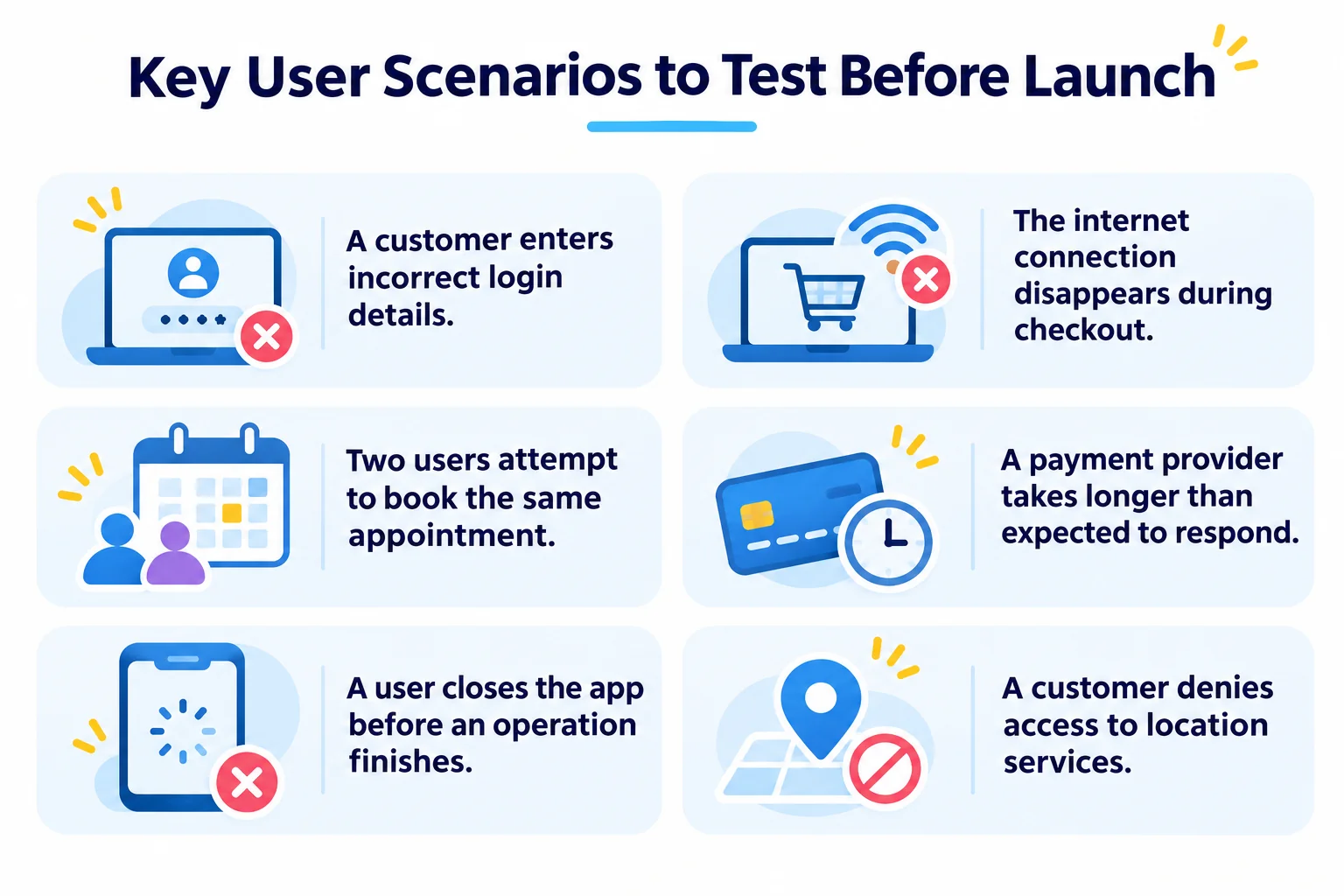
Each scenario helps reveal problems that might otherwise appear after launch.
Protecting personal information
Applications that collect personal data must apply suitable safeguards and comply with relevant legal obligations.
In Malaysia, the Personal Data Protection Act 2010 and the Personal Data Protection (Amendment) Act 2024 provide an important regulatory framework for applicable personal data processing.
Depending on the application and organisation, relevant considerations may include access controls, data security, breach response and data handling responsibilities.
Security planning should begin during development rather than waiting until the application is ready for publication.
Maintaining application performance
A mobile application should respond promptly and use device resources responsibly.
Large images, unnecessary network requests and inefficient background processes can affect loading times and battery consumption.
Performance testing helps developers identify slow operations and understand how the application behaves under different conditions.
A business expecting increased usage should also consider how its backend infrastructure will handle additional requests.
Performance is an ongoing responsibility because user behaviour, software dependencies and operating systems change over time.
How to Keep Your Mobile App Project Manageable
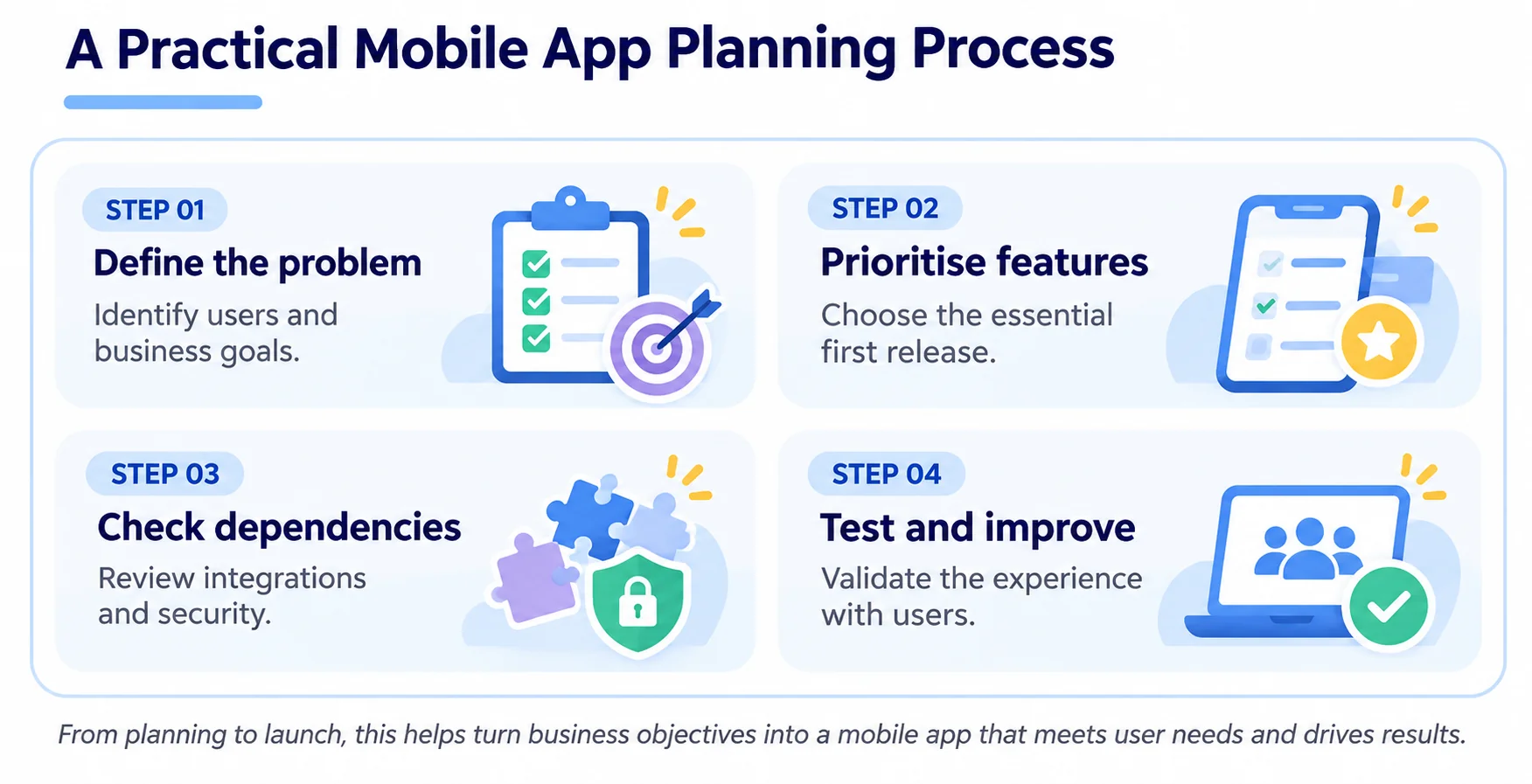
The best way to manage mobile app development complexity is to define a clear purpose, prioritise essential features and validate technical requirements before development begins.
Businesses do not need to solve every possible problem in the first release. They need an application that performs its core functions reliably and supports future improvements.
Start with the problem, not the features
Before deciding what your app should contain, identify the problem it needs to solve.
A restaurant might want to reduce telephone reservations. A retailer might want to improve repeat purchasing. A logistics company might need better visibility over delivery assignments.
Each objective leads to different development requirements.
A useful project brief should explain who will use the app, what they need to accomplish and how the business will measure success.
Separate essential features from future improvements
A minimum viable product, or MVP, focuses on the essential functionality required to test an application with real users.
For example, a fitness studio might begin with class schedules, customer registration and booking confirmations.
Membership rewards, personalised recommendations and advanced reporting could be introduced later.
This approach helps businesses evaluate actual user behaviour before expanding the application.
Map out technical dependencies
Feature planning should include the systems and services needed to support each function.
A booking application that requires customer accounts, payment processing and automated reminders should identify those dependencies early.
Understand the work behind the proposal
Businesses researching mobile app development cost often discover that technical scope matters more than the number of visible features.
Questions such as how much to build an app, what influences app development pricing and what belongs in an app cost breakdown are useful starting points. However, a more productive discussion begins with the application's purpose and technical requirements.
Ask your development partner to explain which systems support each major feature, how the application will be tested and what will happen when external services fail.
These discussions make it easier to understand the proposed development approach without focusing exclusively on financial estimates.
Work with a development partner who understands your goals
A development partner should be able to translate your business requirements into practical technical decisions.
Trinergy Digital, a software and creative technology company in Kuala Lumpur, builds digital solutions including websites, mobile applications and bespoke IT systems.
Businesses exploring application development can learn more about Trinergy Digital's mobile app development services and its guide to mobile app development in Malaysia.
Building an App That Works Beyond the Screen
A successful mobile application depends on more than an attractive interface. Every interaction relies on decisions about data, integrations, security, performance and user experience. Understanding these requirements helps businesses approach development with clearer expectations and make informed choices about the features they need.
Trinergy Digital, a software and creative technology company in Kuala Lumpur, works across mobile applications and other digital systems. Whether you are planning a customer facing application or an internal business tool, defining your objectives and technical requirements is an important first step.